4 Hugues Ross - Blog: Singularity
Hugues Ross
Showing posts with label Singularity. Show all posts

1/7/18

Singularity v0.3 relesed!

Can you believe that it's been 3 years since the last Singularity update? That's crazy! Never fret, I have a new one right here. It ended up landing a week late, but I don't really mind.

Honestly, I don't have much to say about the release itself that I haven't mentioned in a previous blog post. It's funny to see how far I've come since the first release, though. In the original version, you had to wait 10-15 minutes before it would actually open the window. In 0.2, the window would open but you pretty much couldn't do anything until it finished loading anyway. Now, it opens instantly and you can just start reading. Y'know, like any normal application.

I think that's the really funny thing about the progress I've made over the years. I've finally gotten to the point where I can make something "acceptable", something that looks like a run-of-the-mill product. Up until now, my work had more of this... hacked-together student project quality to it. Now, it feels more professional.

I think there are two main factors to this. One is obviously skill, you get better at things with practice. However, I think changing standards have made the more visible impact. For a long time, I developed things with only me in mind. I would embrace bugs and weirdness because the results were close enough to what I needed. Recently though, I've begun to think more in terms of "What would someone else think if they saw this?" As a result, I've been putting more effort into polishing my work.

For a good example of this in action, look at the commits I made between merging my code and making this release. What happened is that I decided to take some screenshots of the program, but realized that there were tons of little inconsistencies and problems that would ruin the shot. This led me to start tweaking and fixing, until everything felt like it met a certain level of quality. In doing so, I realized that several of my earlier additions had been left half-finished, like bits of the column view UI and the popover for new subscriptions. I fixed them up, but I'll have to be more careful about this in the future.

Looking good.

So that's a Singularity update out of the way. I'm still working on my game, slowly but surely. I was planning to release it this weekend, but it's still pretty rough. Since I no longer have a schedule to keep to, I'm in no real hurry to push this game out the door. I'd rather have one good, polished game that took too long than several bad games that I rushed.

11/12/17

Singularity: It's the Little Things

It's been a few weeks since I wrote about some of my old mistakes working on Singularity, and I think it's time for a little follow-up. I've implemented all of the changes that I mentioned (and they work), so I'll be discussing two "smaller" features that I've been working on and what I've learned by working on them.

Look, Ma, no Feedback!

One big problem that I've had in this new version of Singularity is how opaque it is about everything. Before I started working on it again, there was no way to see if any feeds failed to load, or where feeds pointed to. As a result, a feed could go down and silently fail for months while you were none the wiser! Since I'd identified this problem before I started work again, I was already planning to do something about it. To keep things simple, I'm just making the text in the feed sidebar stand out more for now.

So that's the first piece of this puzzle. However, there remains one big problem: What do you do when you know a feed doesn't load? I knew that I had a large number of broken feeds, but without somewhere to see the url it would be difficult to know if the feed had moved or been deleted, or if it was just a parser error.

I'm still mulling over the best solution to the problem. For the moment, I've created a properties page for feeds that contains info like the title and url. This works fine, although it could still use some polish. Another feature that I'm considering is an 'update status' indicator that could display detailed update progress and error messages. Either way, it's clear that Singularity needs to provide more feedback when things fail.

Lesson Learned: Detailed feedback can be very important, and not just as polish!

Getting Organi--Wait, Wrong Series

I'm nearly done with a new feature that, apparently, is one of the most important things to add. When I started rewriting Singularity a while back, I wanted to add folder-like entries to the sidebar so that users could organize their feeds. This seemed like more of a "would be nice" feature than an absolutely vital one, so it was left in a half-finished state.

Boy, was I wrong with this one. I decided to dedicate the weekend to finishing the feature, and it turns out to be a complete game-changer. I didn't expect it to be important, because I mostly just checked my feeds via the 'All Feeds' view. However, I had my logic backwards. I was checking the 'All Feeds' view because there was no other way, not out of preference. I figured this out after sorting all of my feeds into collections, and seeing a result like this:
In the left image, you know nothing other than the fact that there are 3 unread items of some description. What are they? How long will it take to read them? Do I care right now? The program has no answer for you, because the feeds with new items are hiding under 100 others. Even if they were at the top, you could have 30 feeds with one update each. Instead of hunting around, the most obvious solution is always just to click 'All Feeds' and read through everything.

The picture on the right gives much more info. Right off the bat, you know that 3 of the new updates are news articles. If you're about to head out then you probably don't want to check them yet, and you don't have to. It suddenly makes a lot of sense to check the categories that interest you, and leave the stuff you don't want to check for later. I'm glad to have this new feature, but I'm kicking myself over how many months I suffered without it.

Now that it actually makes sense to check things that aren't 'All Feeds', I've also added a small quality-of-life feature: Item views now display the feed/collection that they correspond to. It's a minor thing, but it's nice to have.

Lesson Learned: Just because the user always does something doesn't mean that it's the only way they ever will. Some habits may be a result of weak design.

Conclusion

For the first time in quite a while, I feel happy and optimistic regarding Singularity's future. My last rewrite ending halfway put me in a spot where I was unhappy with the result, but the polish and new features feel like a much-needed breath of fresh air. My goal of a new release by the year's end is starting to look much more realistic!

10/22/17

Dusting the Cobwebs out of Singularity: Mistakes and Lessons

I'm pretty tired today, so I'm going to talk a little about my strategy for finishing up this Singularity update and some of the issues I see in my old code.

Homecoming

Getting back to an old codebase is usually a wince-inducing experience, but this instance was worse than usual. Singularity was always a learning process for me, as I taught myself software development over the past few years. Since putting the project down, I've had close to 9 months of software development experience. Naturally, my skills have changed drastically and my old code looks terrible now.

Since I left off mid-refactor, the code is in a bit of a half-finished state. I don't want to go all the way back to the last update, so I'm trying to fix and re-purpose what I've already got to avoid some poor decisions from the past.

Static Shock

For a long time, I regarded globally-accessible data as a very bad thing. As a result, I avoided static functions and variables like the plague in most of my software. You don't want to overuse these types of things, but it's important to remember that there's pretty much nothing in programming that should always be avoided.

In this case, the most obvious use case for statics is Singularity's settings classes. That's right, there were two of them. Depending on how loose your definition of "settings" is, you could even say that there were three (One to act as an interface to the application preferences, one to provide command-line settings, and one to provide the resolved path to the database). None of them were static, so if I needed them in a class I had to make that class hold a reference to the one(s) I needed. Some of those references even had different names!

I have since made the contents of both "main" settings classes static, and nested the command-line settings into the global settings. While I was at it, I also folded the path resolver into the command-line settings (since that's what decides the db path most of the time anyway). The result absolutely violates SOLID, but that honestly doesn't matter because it also greatly simplifies the affected code and makes it much more understandable.

Lesson learned: Trying to follow a particular coding paradigm perfectly at the expense of your actual design is, naturally, a terrible idea. At the end of the day, there's a time and place for everything.

Shameful SQL

I don't think I've ever really enjoyed working with SQL, nor do I expect this to be a particularly unpopular opinion. Within Singularity's SQLite database, there's a table containing all of the feed entries that it has saved. As it turns out, these entries have no unique keys and are subject to change. That makes swapping them out in a clean fashion damn near impossible.

So where did this terrible idea come from, anyway? The answer is GUIDs. RSS/Atom feed entries require a unique ID. However, we can't use that as our key in the database because keys could overlap between two feeds. My current plan is to combine something from the owning feed with the entry's GUID, and then hash the result. Simple and reasonable, right? Well, my OLD solution for handling updates was this:
  1. Create a new temporary table and fill it with entries that match our feed.
  2. Create a brand new unique index on the GUID (since there's only one feed, it should be unique now).
  3. Save the items to this temporary table
  4. Copy the entire thing back to its original location
  5. Drop the temporary table 
  6. Repeat for every individual feed (about 700 times)
  7. Put the kettle on the stove, because this is going to take a while
Sometimes, (exactly 50% of the time) it crashes the entire program because a GUID managed to show up twice and database errors are treated as critical. Looking back, all I can do is cry.

Lesson Learned: Just because you just learned a couple fancy SQL tricks doesn't mean you should actually use them. Instead, consider if there's a better solution that doesn't overwork your database for no reason. Or at least use a better database, like PostgreSQL or Lucene.

Think Big! No, Smaller!

Often, it's a good idea to consider how well a solution might scale. After all, projects grow in scope over time and you don't want to leave yourself with a subpar solution down the line. On the other hand, it's also important to consider the current scale of the project you're working on.

Case in point, I made the rather poor decision to load as little as possible into memory. This seems smart, since it saves on RAM, but I don't need to do it! Seriously. Let's look at the numbers:
  • I'm subscribed to ~700 active feeds
  • My current Singularity database holds ~1 year of feed entries
  • My current Singularity database is just over 100Mb in size
At this rate, singularity might end up using 1Gb of RAM...in a decade. Most modern web browsers regularly eat up that much right now! By the time the database gets big enough to fill my current machine's 16 gigs of RAM, I'll be several decades underground already. Unless I decide tomorrow to make Singularity into a big public online service, there's no point to optimizing for space.

More than just saving on RAM, I've repeatedly butted heads with a messy "clean up" system to auto-delete entries after a certain length of time passes. This is even more misguided, considering how cheap and plentiful hard drive space is. On top of adding extra bugs and code, this "feature" is much less useful than, say, a simple archival system that hides old entries while still letting you search for them. Unless a user was tracking a ludicrous number of feeds, I really don't see the point in trying any fancy space-saving tricks that slow things down and introduce bugs.

Lesson Learned: Base your projections on real use-cases, not crazy what-ifs and guesswork.

Conclusion

There are plenty of other problems left, but these are the big ones that I'm working on right now. Besides this I've still got a few other projects that I'm toying around with. Still, this one has my interest right now so you can probably count on more updates as development continues.

8/30/16

Singularity: Multi-threading for dummies

Finally, I'm back for another update. Sorry about the wait, but I think this one will be nice and informative.

I've been working on getting Singularity's new version ready for use, and it's now almost at a point where I can use it as my daily driver. Today, I'm going to discuss how I've changed Singularity to feel faster and smoother by moving most of the work it does to separate threads.

Disclaimer:

the following post is meant as a simple (ish) introduction to event-driven applications and multi-threading for non-programmers. This is not a comprehensive guide, and I smooth over many details. It's certainly not a good introduction for developers looking to learn multi-threading, so please keep that in mind while reading this post.


The Problem

In the previous version of Singularity, I'd noticed some performance issues. Updates took a fairly long time to run, and even just starting up the application could cause a few seconds of unresponsiveness as it loaded up the initial data. One of my goals for the new version was to eliminate any unresponsiveness, and make everything just a bit faster and smoother.

However, the new version was much, much worse. The initial lag was gone, but updates took much longer and continued to leave the application frozen. Even just scrolling quickly could cause lag!

But why? Let's look deeper...


Where Do Lockups Come From?

Let's step back for a moment and discuss unresponsiveness in general. In many older, or poorly-coded applications, some actions can cause the application to freeze temporarily. Nothing will happen when you click on buttons or type, and the display might even display other windows on top of it! See below for an example:

Image courtesy of Wikipedia


If you don't write code, you might find this perplexing, but the reason is quite simple. It all comes back to how an application "flows".

Most modern applications are event-driven. Don't run away, it'll make sense in a moment! They run using a main loop, which is a fancy way to say that the do the same common set of actions over and over again, forever. A simple window that does nothing might look like this:
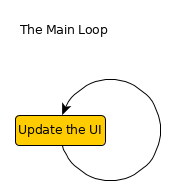
Note: UI means "user interface". It's the stuff that is shown to the user.
Every time the loop begins, it will do something like this:
  1. Check for input. This could be clicking, moving the mouse, pushing buttons on your keyboard, or anything else that the programmer wants to know about.
  2. When it gets the input that the programmer wants, it will do something immediately. This is why our application is event-driven: It waits for an event to happen, like getting input, then responds to the event.
  3. If it needs to, it redraws itself to the screen. This usually only happens if something has changed, like a switch being flipped or an animation playing.
As you can see, the main loop is fairly simple: Our window waits for something to happen, redraws its contents, then repeats. Even trying to close the window is just another event: If we don't tell it to close, it won't.


So, what happens when we add a cool button to our window? When we click the button, we'll do something. It doesn't really matter what. Let's go back to our flowchart:
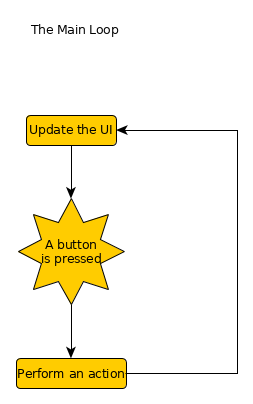
Maybe it plays an airhorn sound?
Notice how pushing the button and performing the action happen before the loop repeats? Most code works in a linear fashion: It can only do one thing at a time. Pushing the button stops our application from looking for input or redrawing itself until it's done working.

Next, we'll make our button check 100 sources for updates when pressed. After all, we need our news! Here's what happens:
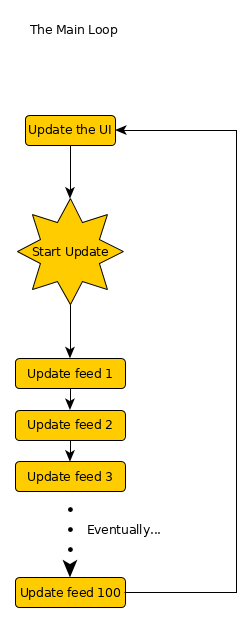
This could take a while!
This could easily take a few minutes, and the whole time our application can do nothing else. Moving your mouse to another button and clicking will do nothing. And how could it? It's busy updating, and it can't check to see that you clicked until it's done. Even adding a progress bar wont help--It can't draw any changes to the bar until it's done with the updates.

Our users will be furious! How can we solve this problem?

First Pass: Networking

So, that's basic explanation of the problem that was facing Singularity. The updates were taking longer for two reasons: I was making some extra checks to improve the cleanup feature, and I was speeding up my updates in the old version using a method that I'll explain in another post. What I did to help alleviate the problem was create a separate thread for running updates.

What's a Thread?

Remember when I said that most code works in a linear fashion? Every action has to happen in order, as if it was following a line. Or in this case, a thread. And that's exactly what threads are: A thread can be thought of a list of instructions for the computer to follow. A single-threaded application is an application like the one above, that does one thing at a time. A multi-threaded application creates new threads, allowing it to do several things at the same time.

Still following me? They say a picture is worth a thousand words, so let's make our application check for updates in a second thread:
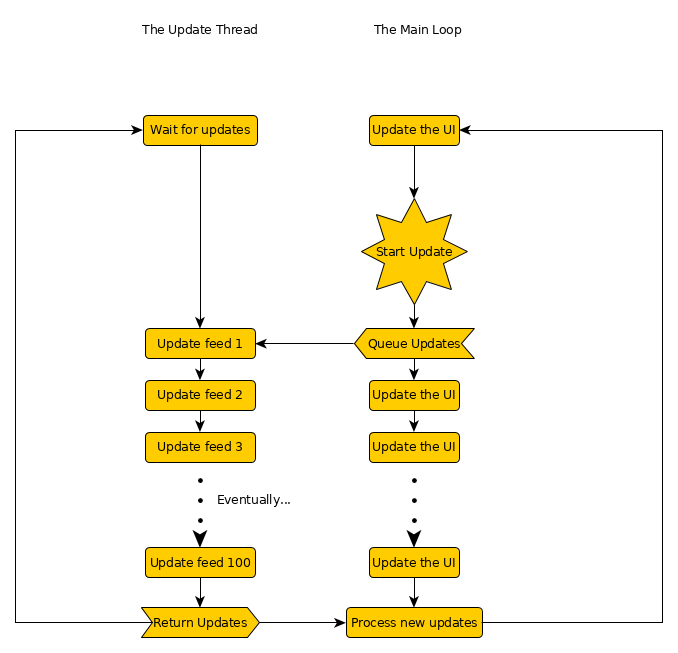
Note the branch after start update, and how the two lines merge back together after running the updates.
When we push our button now, all the main thread (the thread with our main loop) has to do is tell the update thread to start checking. While the update thread does the heavy lifting, our main thread can get input, redraw itself, and act responsive and alive while it works. We win!

However, it's not perfect. As soon as the updates finish loading, the window freezes again. It has to process and save the new updates to our database, and we can't tell our update thread to do it. I have several reasons for this, but to keep things simple I'm not going to get into it. It suffices to say that we should avoid having our update loader save our updates.

How do we get around this issue?


Second Pass: Database IO

 If you've been observant, you may have noticed that our update thread is also a loop. After sending the updates back to the main thread, it goes back to waiting. We can do something similar with our database too: By making it wait for requests (input), we can have it react to requests that we make.

Just like the update thread, we can make a database thread and ask it to save our updates. Now our main thread will have almost nothing keeping it from its important duty:
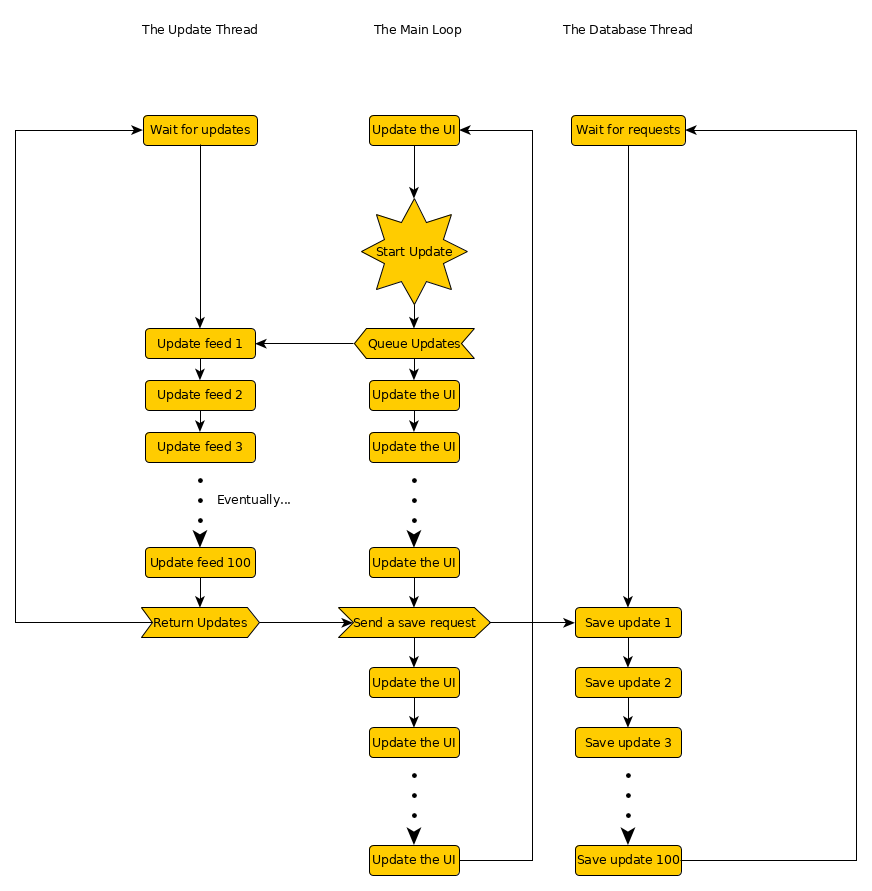
Note how the database sends nothing back. It doesn't need to since it's just saving, but we could always return something like the number of updates saved.

One advantage of this design is that our database can take any sort of request that we make, and all database interactions no longer stop our application from running smoothly.


The Results

This is an excellent start, although it doesn't solve all of our problems. Our application should never freeze or stutter anymore, but it's still slow as molasses when running updates. We also won't be able to use our database while saving updates, so any actions that involve the database will simply be delayed until the save is done. Our users won't think the application is broken, but they'll soon learn to hate that little progress bar in the corner.

To fix this, we can add more threads for handling more updates at a time, or give database requests priority levels (both of which I've done, although the priorities are still a work-in-progress), both of which will make things feel a bit faster and smoother. Ultimately, there are limits to how much you can optimize an application, but there's a lot that can be done to make things feel silky-smooth.

7/13/16

Listening to Your Javascript

It's been a while, but I haven't been idle. I've made a great amount of progress on Singularity, and I've finally discovered a secret that has eluded me for years!

The Problem

These stories always have to start with a problem. In this case, the problem was a seemingly simple one:

"When the user interacts with Singularity's WebKitGTK viewport, how do I make the app react to it?"

This used to be really easy, back in the days of Webkit 1. However, when Webkit2 changed the API and moved some functionality to it's web extension API, Javascript support followed suit. For a long time, the only solution was to simply create an 'extension' that used some form of IPC to communicate with the main app, but I didn't want to do that in Singularity. Instead, I used a crude hack by encoding messages in URL requests.

A Tentative Solution

Needless to say, this solution is slow and terrible, but I've found a better answer. At some point since my work on Singularity started, WebKit introduced the UserContentManager, which can apply custom CSS and Javascript to web pages. This is a really awesome feature that I plan on using in future projects, but it also provides me with a new tool, a signal for handling certain Javascript calls. According to valadoc.org:

public signal void script_message_received (JavascriptResult js_result)
"This signal is emitted when JavaScript in a web view calls
window.webkit.messageHandlers.name.postMessage()
after registering name using register_script_message_handler"

In other words, it lets you set up a callback that is called whenever a script calls a certain function, sending arbitrary data from the web page to the application displaying it. This is a really powerful feature.

So powerful, in fact, that you can't actually use it in Vala.

What Gives?

As it turns out, Vala's JavascriptResult class has no useful functions or properties. I'm not entirely certain why, given the solution that I'm about to provide.

While WebKitGTK's JavascriptResult does contain the necessary functions, no Vala bindings exist for them. Instead, you need to access them from C and return whatever result your app is expecting. This seems really odd, and I hope I don't have to find out the hard way later on, but for now I'm feeling pretty good about this.

I'll be posting an update with a more thorough rundown of my work on Singularity soon.