4 Hugues Ross - Blog: Informative
Hugues Ross
Showing posts with label Informative. Show all posts

12/25/18

Halberd: That's my property!

To anyone reading this on the same day that I post, Merry Christmas! Here's a little present: This year's final Halberd-related blog post.

Of my current priorities on Halberd, one of the biggest is building and integrating a property grid. I think this is a very interesting endeavor, and hopefully you'll see it the same way!

So what's a Property Grid?

When I spoke to some (programmer) friends about this, I was surprised to find out that some of them didn't initially know what a property grid was. So, let's start with definitions.

As the name implies, a property grid is a ui widget that lets the user inspect and edit the properties of an object. It usually amounts to a list of named fields, and you can find one in just about any game engine. Here are a few examples:

UE4's 'details panel' is a form of property grid
As expected, Unity's inspector panel is another good example
The ActiPro Windows UI framework also features a property grid
The GTK UI builder, Glade, also features something in this vein

If you're a game developer, you've probably figured out by now that property grids are a really important game development tool. This is even more true in RPGs, due to the large amounts of 'database' assets which lend themselves well to this type of UI pattern.

Digging deeper: How does a property grid work?

Like any programming problem, there are many ways to implement property grid functionality. However, I'd put most methods into one of 3 groups: Inspected, Declared, and Fixed. These are just personal categories, not proper terms, but I think they showcase some real differences.

An Inspected property grid assembles itself by looking at real game data and converting it to ui. This is typically done through Reflection, either by looking at data in a scripting layer or with a language that natively supports this, such as C#. For languages that can't do this out of the box, a dynamic class/property system can be added on top of the normal code. Examples of such systems can be found in Unreal Engine 4 and the GObject framework.

A Declared property grid is also dynamic. However, instead of inspecting objects at runtime it queries their information from a predefined source, such as a schema or similar descriptive document. Then, it sends data back and forth via Serialization instead of reflection. The result is less flexible, but it's also simpler and the underlying game code may be more performant since dynamic properties aren't necessary.

Finally, there is the Fixed property grid. I call this a property grid, but that may be an overstatement--this grid is essentially just a hard-coded bit of ui for interfacing with an object. By its nature, it's quite simple and totally static. Of course, it's also difficult to maintain and requires constant updates as the underlying data changes.

Depending on your use-case, any of the above can be valid approaches. The fixed solution may seem bad, but sometimes it's the best option: You don't need a powerful and complex solution just to edit a couple of fields.

What have I got?

At the moment, Halberd is stuck with the fixed style. I went for this solution early on to avoid getting bogged down while developing my proof-of-concept, but the scaling problems of this approach are starting to appear.

The general process of adding a new property to an object right now is:
  1. Add the property
  2. Add serialization for saving/loading
  3. Add simple getters/setters for editing
  4. Add the property to a Vapi file for interop access
  5. Add the property's editing widget to the ui file
  6. Add the widget code to the editor's vala class, including the signals for changing the property
That's a lot of steps for one property. With a simple property grid, I could skip steps 3-6 entirely and greatly streamline my development process.

A new property grid

With all that in mind, I decided to try out something better. Since most of my code is C, the declared style is necessary. But how to prepare the meta-information about the properties? In my case, it was actually rather simple. Since I already serialize my data to XML, I decided to go with the obvious option: XSD.

For the uninitiated, XSD is an XML-based schema standard for describing other XML files. While intended for databases, with a few additions the result can work quite well for defining a property grid!

The result looks like this:
You might recognize this as DFGame's editor demo which I completed last year. The controls were hard-coded since it was just a viewport showcase at the time, but now the editable parts are totally data-driven!

The schema that the editor is based on is a bit wordy, but pretty straightforward:
    1 <xs:schema
    2     xmlns:df="/org/df458/dfgame"
    3     xmlns:xs="http://www.w3.org/2001/XMLSchema"
    4     elementFormDefault="qualified">
    5     <!-- Types -->
    6     <xs:simpleType name="fill_type">
    7         <xs:restriction base="xs:string">
    8             <xs:enumeration value="true" df:displayName="Filled"/>
    9             <xs:enumeration value="false" df:displayName="Wireframe"/>
   10         </xs:restriction>
   11     </xs:simpleType>
   12     <xs:simpleType name="size_type">
   13         <xs:restriction base="xs:float">
   14             <xs:minInclusive value="0"/>
   15             <xs:totalDigits value="6"/>
   16         </xs:restriction>
   17         <xs:annotation>
   18             <xs:documentation>A decimal value above 0</xs:documentation>
   19         </xs:annotation>
   20     </xs:simpleType>
   21     <xs:simpleType name="degree_type">
   22         <xs:restriction base="xs:float">
   23             <xs:minInclusive value="0"/>
   24             <xs:maxExclusive value="360"/>
   25         </xs:restriction>
   26         <xs:annotation>
   27             <xs:documentation>An angle in degrees</xs:documentation>
   28         </xs:annotation>
   29     </xs:simpleType>
   30 
   31     <!-- Triangle struct -->
   32     <xs:complexType name="triangle">
   33         <xs:attribute name="size" type="size_type">
   34             <xs:annotation>
   35                 <xs:documentation>The size of the triangle</xs:documentation>
   36             </xs:annotation>
   37         </xs:attribute>
   38         <xs:attribute name="angle" type="degree_type">
   39             <xs:annotation>
   40                 <xs:documentation>The angle of rotation</xs:documentation>
   41             </xs:annotation>
   42         </xs:attribute>
   43         <xs:attribute name="color" type="df:color4">
   44             <xs:annotation>
   45                 <xs:documentation>The color of the triangle</xs:documentation>
   46             </xs:annotation>
   47         </xs:attribute>
   48         <xs:attribute name="is_filled" type="fill_type" df:displayName="Style">
   49             <xs:annotation>
   50                 <xs:documentation>Toggles filled/wireframe rendering</xs:documentation>
   51             </xs:annotation>
   52         </xs:attribute>
   53     </xs:complexType>
   54 </xs:schema>
One way to reduce the workload even further would be to tie this into a code generation system, but that strikes me as overkill for the time being...

What now?

I've been working on this feature for a few weeks now, but I finally merged it into DFGame's master branch yesterday. The next step will be to try and integrate it into Halberd, I'm sure there'll be more to do but I think this feature is a good investment for future work! Once the property grid's in place, the work will hopefully start moving a bit quicker.

7/22/18

Making the first Halberd game

It's done! Earlier this week, I finished the last of the features I needed for Halberd's MVP. I'm going to sit down and make a game with it now, so I thought I'd bring you along for the ride. Please bear in mind that Halberd is still in a very rough state, I've done basically no polish or UX work with this version yet.

Why Make a Game Before Release?

Longtime readers have likely noticed that I do this all the time, but don't really explain why I take the time to make games before engine releases. In fact, I even denounced this practice during a retrospective last year (For the curious but lazy, check the section titled "Total Overkill"). So why am I doing it now?

There are a few good reasons why I feel a need to make a game before pushing my work to the internet and calling it a day:
  1. Making a game is a way to validate that the tool works, by forcing me to engage with all of its features. If there are any bugs or missing parts, I can fix them before release. It also lets me see which features need the most love and which are 'good enough' as-is.
  2. Having games made in an engine is also good for proving its capabilities. Anyone can make game development tools, but if no good games have ever been made with them then they'll be a tough sell for other devs.
  3. Finally, games can also serve as a useful reference for anyone who wants to try Halberd out. I don't think anyone will at this point in development, but when people do start using it they'll have something to help them.
Clearly, there are some real benefits to using your own tools before offering them to the world. But why not small demos like I did with DFGame?

In response to my previous post, I would argue that the circumstances around Halberd make points 2 and 3 legitimate in a way that they weren't for DFEngine. My stated goal with Halberd is to produce a game engine as a product for others to use, whereas my old mistakes were mainly for personal use. I've seen certain engines receive criticism in the past because the devs didn't use them to make their own games, so clearly this is a factor that some people care about.

Additionally, the large scope of Halberd makes it a real marathon of a project. I need to break it up with smaller game projects if I want to keep my sanity! Not all of my 'filler' will be made with Halberd, but it's still a convenient excuse to give the engine a workout.

About the Game

Right now, Halberd's limited featureset heavily restricts what I can and can't do. To get around that, I'm going to start things off with a very simple game about a knight slaying a dragon. It's a typical story that has been done to death, but that makes it easy to work with, perfect for a limited toolbox. We can try some more exciting things for future versions of the engine.

Due to the limitations, I'm also aiming for around 8-10 minutes of gameplay. That should be enough for the game to show off everything Halberd currently has to offer without overstaying its welcome.

Too Much Information?

With this mini-project, I'm going to do something different from my usual fare. Nowadays I mostly write posts when I have some specific 'theme' or aspect of a project that I want to cover, but that leaves out a lot of potentially interesting things. I never really write about anything outside of fairly dry programming topics, but I enjoy other aspects of development too.

I think it could be interesting to share my process in detail, so I'm going to try documenting everything I do and see how things turn out. Assuming it all goes how I want it to, you'll be able to see the game's assets take shape from start to finish, including any drafts and thrown-out ideas. It'll slow the pace of the project down, but I think the idea has enough merit to try just once.

You can expect a few weeks (hopefully no more than that) of posts talking about various parts of the game as I work on it. Following that, I'll probably return to my usual non-schedule.

5/29/18

Halberd: Let's Talk Architecture

I knew this day would come...

...a dark, fateful day...

...when I actually have to care about code architecture


Halberd's development is chugging along, and now that I've gotten a few systems together my codebase is starting to get a little bit cluttered. That means it's time to tidy it up.

Why the Wait?

Personally, I believe that a lot of independent devs overthink game architecture. There's a certain school of thought that dictates that your code should be a perfect, well-oiled machine that's designed to handle anything you throw at it. That's all well and good in theory, but I've always had my doubts that most indies starting a "from scratch" project actually need more than a quickly-assembled Rube Goldberg machine, held together with twine and masking tape.

There are two primary reasons behind this notion of mine:
  1. Your customer does not care about code quality - They really don't. You could have the most beautiful, well-structured code, and a terrible game that no-one wants. On the other hand, your code could be a tire fire and no-one would notice if you managed to keep the game bug-free. As such, polish and quality should be put where it matters the most.
  2. Good architecture is an investment - And of course, investments have an upfront cost. Designing and building solid game architecture takes time, and implementing new code to work with it can also take longer in some circumstances. In return, you make your code more readable and maintainable in the long-term. However, games are often short-term projects and smaller titles are unlikely to fully reap the benefits, while still paying the cost.
Ultimately, I think a lot of novice devs see various patterns being touted as "best practices", and don't consider whether they'll actually benefit from them in the end. Nowadays, my usual approach to architecture is "as little as possible, until it is necessary".

Why now?

Now that I've written 4 paragraphs about why I usually avoid over-engineering like the plague, let's talk about why I've chosen to begin restructuring my code.

Unlike an internal engine built to develop one or two games, Halberd is intended to be an all-in-one tool used by others. That alone isn't necessarily an argument for needing architecture, but it does highlight one important point: This project will require long-term development and support. Along with large teams, long-term projects are among the truly valid use-cases for sound architectural design in my opinion.

If this were the only factor, I wouldn't be too worried yet.The other issue is that my code is starting to get rather complex, another good sign that some straightening out is necessary. More specifically, I'm dealing with:
  • Language interop
  • Data that must be edited and tested non-destructively at runtime
  • Modal input/display (due to switching between PIE and editing)
  • An engine that links into two different front-ends, and must be able to immediately start in any state (menus, combat, map, etc)
Technically, I have all of that already. Problem is, the level of complexity is turning it into a mess. So, it's time to refactor.

What's the Plan?

When you have a clear need for architecture, the next step is to plan it all out. I've done that already, and I'm going to step you through my process in hopes that it'll be helpful.

First of all, we have to consider our requirements. To begin with, we know that the editor and game are going to be Vala and C, respectively. We also know that our exported game shouldn't include any Vala code, giving us the following high-level relationships:
That has already existed since the beginning of the project, so the next step is to look a bit deeper. Specifically, let's look at how the asset editors are laid out, since my impression is that this is the messiest part. Right now, your average editor looks a little like this:
First off, let's get rid of the doubled-up viewport. As a GTK widget, the viewport shouldn't be owned by anything on the C side, but is so that they can check for things like size changes. If we add an event to DFGame for handling window size changes (which is a good idea to begin with), we can at least remove one of the references.

The other obvious problem here is that the C side is clearly doing two things, editing and testing. As a result, there are multiple copies of each child. The simple solution is to split off any test-related data into its own struct, ensuring a proper separation of responsibilities:
So, what about this new "Game Context" that just popped up? Right now, I'm in a position where I haven't had to think too much about how to put the different game elements together. Since I'm rapidly approaching the point where I will need to do that, let's talk about structuring the game state. Right now things are split:
So, what can we do about this? Clearly, the data here needs to be known to the two "states", but we need a way to manage them and make some data (such as the player) available across all of them. We also need to be able to handle things one at a time (We shouldn't be able to run around the map during a fight, after all) without losing information about other parts of the game. To me, this demands a certain structure:
I think a stack makes a lot of sense for this sort of interaction, because there's a lot of "layering" that can happen in an RPG.

Imagine you're walking through the woods, when a bunch of bandits appear to tell the party that they have a bounty on their heads. The bandits attack, then halfway through the fight some allies join in to help even the odds.

This feels pretty typical by the standards of scripted battles, and it fits this structure perfectly: Map, with a Cutscene within it, which initiates an Encounter, during which another Cutscene plays. And of course, most of these states clearly return to the previous state when they conclude. That's perfect territory for a stack-based solution. Since a stack needs something to manage it anyway, we can also make the manager handle our 'global' information, such as the player's stats and inventory.

Back to the editor, this means that we can use our test context to take the edited data in memory, convert it into a game state, and pass it to the game context to push it onto the stack. If we make an event for when the stack empties, we can also return to the edit mode automatically when something like an encounter in test mode finishes. I can also reuse this feature later to know when the final game needs to exit.

Ultimately, we get something that looks like this at a higher level:

Pretty close! There's a little bit more to figure out, but I think I've covered the important parts here.

So that's all?

Nope, not by a long shot. Iteration is key in software development, so I'm sure to return to the drawing board sooner or later. In the meantime though, this design will help make my code easier to maintain. This little diversion has slowed me down for a bit, but I think it'll be worth it regardless. Since I'm still making pretty good time right now, I can also afford to spend time on these sorts of things. As the Roadmap page shows, I'm getting pretty close to my first milestone!

12/19/16

Let's Make a Roguelike, for the 3rd Time

Hello again! Last week, I promised the return of my roguelike tutorial. Today, I'm making good on that promise. Sort of.

I've pushed out a new update to the site and blog, which the observant among you may have noticed already. In addition to making the navigation bar a little bit nicer looking, I've also reorganized the pages a bit. The portfolio section is completely gone, because it never had any content and I don't really need one right now. To fill the space, I've split the games page off of the software page, and added a section for tutorials. The overall theming of the site has gotten some tweaks, and if you click the logo in the upper left-hand corner, then you'll see a very rough work-in-progress landing page. I could have withheld it, but I think it looks better than the word 'Placeholder'.

The tutorial section is also a bit of a work-in-progress. I'm planning on remaking the ring segment collision tutorial that I did a while back, but that could still be a while from now. i also need to play with the theme some more to make it look more polished.

The Tutorial

I've put up the first entry of the new-and-improved roguelike tutorial, a nice little introductory page. You can read it here. It borrows a couple sections from the old part 1, but most of the content is new. It's probably not the most exciting start for a new series but I expect the new tutorial to have a slightly faster pace overall, so hopefully that will offset the slow start.

That's all for the moment! You can expect the first numbered chapter of the tutorial to be up on January 2nd, and more will come every other Monday after that. This means that I might have the beginnings of a schedule! I'll be posting here whenever I put up a new part, and you can expect the other regular posts to appear once in a while, as they typically do. I'm still waiting for my projects to get an official OK from on high, so in the meantime please enjoy these updated tutorial chapters.

8/30/16

Singularity: Multi-threading for dummies

Finally, I'm back for another update. Sorry about the wait, but I think this one will be nice and informative.

I've been working on getting Singularity's new version ready for use, and it's now almost at a point where I can use it as my daily driver. Today, I'm going to discuss how I've changed Singularity to feel faster and smoother by moving most of the work it does to separate threads.

Disclaimer:

the following post is meant as a simple (ish) introduction to event-driven applications and multi-threading for non-programmers. This is not a comprehensive guide, and I smooth over many details. It's certainly not a good introduction for developers looking to learn multi-threading, so please keep that in mind while reading this post.


The Problem

In the previous version of Singularity, I'd noticed some performance issues. Updates took a fairly long time to run, and even just starting up the application could cause a few seconds of unresponsiveness as it loaded up the initial data. One of my goals for the new version was to eliminate any unresponsiveness, and make everything just a bit faster and smoother.

However, the new version was much, much worse. The initial lag was gone, but updates took much longer and continued to leave the application frozen. Even just scrolling quickly could cause lag!

But why? Let's look deeper...


Where Do Lockups Come From?

Let's step back for a moment and discuss unresponsiveness in general. In many older, or poorly-coded applications, some actions can cause the application to freeze temporarily. Nothing will happen when you click on buttons or type, and the display might even display other windows on top of it! See below for an example:

Image courtesy of Wikipedia


If you don't write code, you might find this perplexing, but the reason is quite simple. It all comes back to how an application "flows".

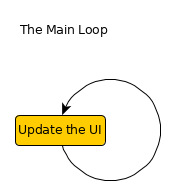
Most modern applications are event-driven. Don't run away, it'll make sense in a moment! They run using a main loop, which is a fancy way to say that the do the same common set of actions over and over again, forever. A simple window that does nothing might look like this:
Note: UI means "user interface". It's the stuff that is shown to the user.
Every time the loop begins, it will do something like this:
  1. Check for input. This could be clicking, moving the mouse, pushing buttons on your keyboard, or anything else that the programmer wants to know about.
  2. When it gets the input that the programmer wants, it will do something immediately. This is why our application is event-driven: It waits for an event to happen, like getting input, then responds to the event.
  3. If it needs to, it redraws itself to the screen. This usually only happens if something has changed, like a switch being flipped or an animation playing.
As you can see, the main loop is fairly simple: Our window waits for something to happen, redraws its contents, then repeats. Even trying to close the window is just another event: If we don't tell it to close, it won't.


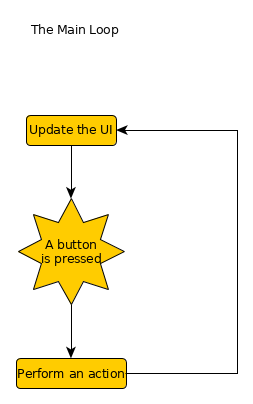
So, what happens when we add a cool button to our window? When we click the button, we'll do something. It doesn't really matter what. Let's go back to our flowchart:
Maybe it plays an airhorn sound?
Notice how pushing the button and performing the action happen before the loop repeats? Most code works in a linear fashion: It can only do one thing at a time. Pushing the button stops our application from looking for input or redrawing itself until it's done working.

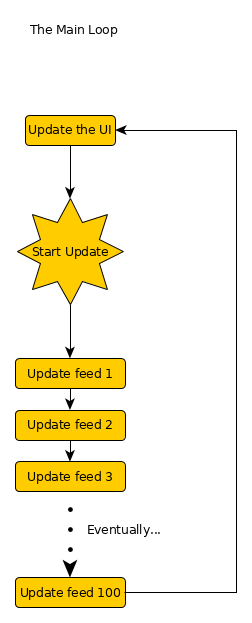
Next, we'll make our button check 100 sources for updates when pressed. After all, we need our news! Here's what happens:
This could take a while!
This could easily take a few minutes, and the whole time our application can do nothing else. Moving your mouse to another button and clicking will do nothing. And how could it? It's busy updating, and it can't check to see that you clicked until it's done. Even adding a progress bar wont help--It can't draw any changes to the bar until it's done with the updates.

Our users will be furious! How can we solve this problem?

First Pass: Networking

So, that's basic explanation of the problem that was facing Singularity. The updates were taking longer for two reasons: I was making some extra checks to improve the cleanup feature, and I was speeding up my updates in the old version using a method that I'll explain in another post. What I did to help alleviate the problem was create a separate thread for running updates.

What's a Thread?

Remember when I said that most code works in a linear fashion? Every action has to happen in order, as if it was following a line. Or in this case, a thread. And that's exactly what threads are: A thread can be thought of a list of instructions for the computer to follow. A single-threaded application is an application like the one above, that does one thing at a time. A multi-threaded application creates new threads, allowing it to do several things at the same time.

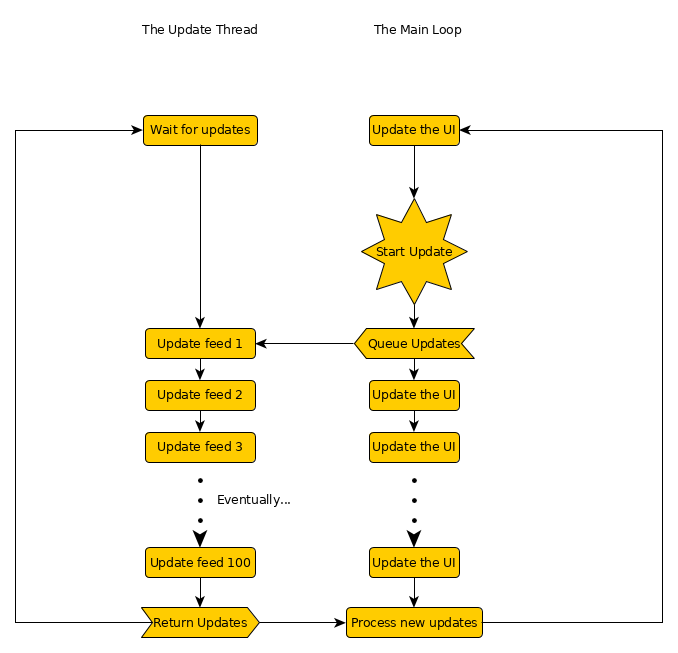
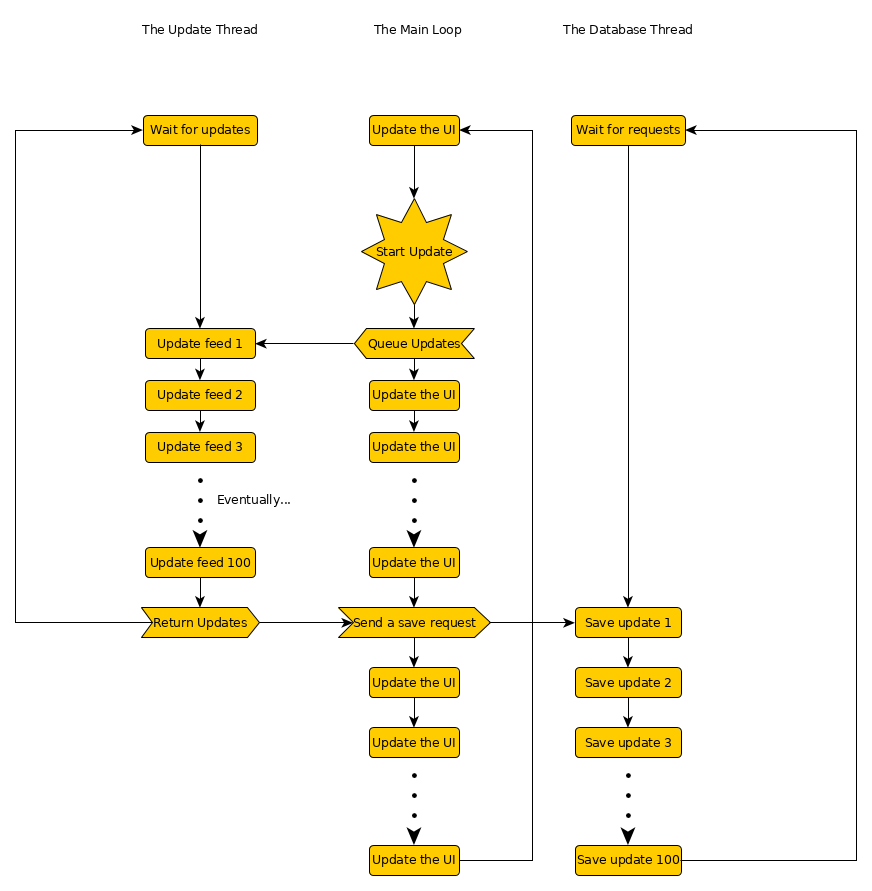
Still following me? They say a picture is worth a thousand words, so let's make our application check for updates in a second thread:
Note the branch after start update, and how the two lines merge back together after running the updates.
When we push our button now, all the main thread (the thread with our main loop) has to do is tell the update thread to start checking. While the update thread does the heavy lifting, our main thread can get input, redraw itself, and act responsive and alive while it works. We win!

However, it's not perfect. As soon as the updates finish loading, the window freezes again. It has to process and save the new updates to our database, and we can't tell our update thread to do it. I have several reasons for this, but to keep things simple I'm not going to get into it. It suffices to say that we should avoid having our update loader save our updates.

How do we get around this issue?


Second Pass: Database IO

 If you've been observant, you may have noticed that our update thread is also a loop. After sending the updates back to the main thread, it goes back to waiting. We can do something similar with our database too: By making it wait for requests (input), we can have it react to requests that we make.

Just like the update thread, we can make a database thread and ask it to save our updates. Now our main thread will have almost nothing keeping it from its important duty:
Note how the database sends nothing back. It doesn't need to since it's just saving, but we could always return something like the number of updates saved.

One advantage of this design is that our database can take any sort of request that we make, and all database interactions no longer stop our application from running smoothly.


The Results

This is an excellent start, although it doesn't solve all of our problems. Our application should never freeze or stutter anymore, but it's still slow as molasses when running updates. We also won't be able to use our database while saving updates, so any actions that involve the database will simply be delayed until the save is done. Our users won't think the application is broken, but they'll soon learn to hate that little progress bar in the corner.

To fix this, we can add more threads for handling more updates at a time, or give database requests priority levels (both of which I've done, although the priorities are still a work-in-progress), both of which will make things feel a bit faster and smoother. Ultimately, there are limits to how much you can optimize an application, but there's a lot that can be done to make things feel silky-smooth.

7/13/16

Listening to Your Javascript

It's been a while, but I haven't been idle. I've made a great amount of progress on Singularity, and I've finally discovered a secret that has eluded me for years!

The Problem

These stories always have to start with a problem. In this case, the problem was a seemingly simple one:

"When the user interacts with Singularity's WebKitGTK viewport, how do I make the app react to it?"

This used to be really easy, back in the days of Webkit 1. However, when Webkit2 changed the API and moved some functionality to it's web extension API, Javascript support followed suit. For a long time, the only solution was to simply create an 'extension' that used some form of IPC to communicate with the main app, but I didn't want to do that in Singularity. Instead, I used a crude hack by encoding messages in URL requests.

A Tentative Solution

Needless to say, this solution is slow and terrible, but I've found a better answer. At some point since my work on Singularity started, WebKit introduced the UserContentManager, which can apply custom CSS and Javascript to web pages. This is a really awesome feature that I plan on using in future projects, but it also provides me with a new tool, a signal for handling certain Javascript calls. According to valadoc.org:

public signal void script_message_received (JavascriptResult js_result)
"This signal is emitted when JavaScript in a web view calls
window.webkit.messageHandlers.name.postMessage()
after registering name using register_script_message_handler"

In other words, it lets you set up a callback that is called whenever a script calls a certain function, sending arbitrary data from the web page to the application displaying it. This is a really powerful feature.

So powerful, in fact, that you can't actually use it in Vala.

What Gives?

As it turns out, Vala's JavascriptResult class has no useful functions or properties. I'm not entirely certain why, given the solution that I'm about to provide.

While WebKitGTK's JavascriptResult does contain the necessary functions, no Vala bindings exist for them. Instead, you need to access them from C and return whatever result your app is expecting. This seems really odd, and I hope I don't have to find out the hard way later on, but for now I'm feeling pretty good about this.

I'll be posting an update with a more thorough rundown of my work on Singularity soon.

2/11/16

Console Programming 3-Week Project 1 - Texture Loading in DFGame

What is this?

In one of my current classes, students are expected to design and implement coding projects of their choosing, then provide a writeup on their blog or portfolio where they explain the project. This is my first writeup, and you can expect 2 more similar posts later in the year.

As I've mentioned previously, one of my goals for the year is to ditch the DFEngine project and go back to developing games from the ground up. Instead of building on a large, monolithic engine, the goal is to implement lots of helpful code in libraries, which I can use to get started on projects quickly. I gave the library, DFGame, a short mention in a recent Halberd update, but I didn't go particularly in-depth as to what I'm actually doing with the engine. Here, I'll be documenting the work I've done on this engine over the past 3 weeks.

A General Overview of DFGame

Technically speaking DFGame is actually a set of 5 libraries broken up into the following modules:
  • common - The common code that all other modules rely on. Contains various low-level systems such as IO and logging.
  • editor [empty] - The editor-specific backend. Examples of editor-specific backend code include debug drawing, or handling assets that are baked or repackaged in the final exported game.
  • game [empty] - The game-specific backend. Mostly intended for game logic. This is deliberately separated from the frontend code to allow embedding it directly into an editor instance.
  • editor-front - The editor-specific frontend. Written in Vala, and provides helpful widgets and classes for building a graphical GTK3-based editor interface.
  • game-front [empty] - The game-specific frontend. Examples of game-specific frontend code include graphics context creation, or main loop handling.

Note: Why Vala?

I chose to use Vala for all developer front-end code for the same reasons as with Halberd. Writing GTK code (or any UI code, for that matter) in C is a huge pain. Dealing with inherently hierarchical systems like a complex user interface is one of the few most obvious advantages of object-oriented programming as a whole.

I chose Vala because it is fully compatible with C, even more than C++. Vala uses vapi files and gobject-introspection to convert a C#-like object-oriented syntax directly to GObject C, allowing for it to both use and be used in C code. I consider the flexibility that Vala affords me to be extremely valuable.

Using this system of modules gives me a few specific advantages:
  • It physically separates my code, which organizes it and also forces me to decouple distinct sections of my codebase as much as possible.
  • I can write functions that do the same things in different ways for different purposes. For instance, I can write an editor asset loader for my editor that reads in an xml file, then write a game loader for the same asset that loads it from compressed binary.
    • This same principle can be applied to a number of other uses, such as handling logs. If I had to specifically prefix all of these functions with whether they belonged to the editor or the game, then sort through all of them every time they were needed, I'd probably sob into a pillow before going to sleep at night.
  • It allows me to link game logic and rendering into my editor for play-in-editor support, (A necessary feature in any modern engine) without having to perform folder wizardry with multiple main functions.
I've taken the time to write pkg-config files for every module, so linking against DFGame on any *NIX system is a breeze.

The DFGame Texture Loader

In DFGame, textures are stored in a super-simple texture struct:

typedef struct texture
{
    GLuint    handle;
    uint16_t  width;
    uint16_t  height;
} texture;

The handle refers to a texture buffer handled by OpenGL, and is guaranteed by all texture-related functions to be in 32-bit RGBA format.

Note

When I refer to the bit depth of an image, I'm referring to the number of bits per-pixel, not per-channel.

You might notice that I'm using 16-bit unsigned integers to store the texture dimensions. As it turns out, a 32-bit true color image with the maximum dimensions that this struct supports would take up approximately 135 Gigabytes of VRAM. (Also, most OpenGL implementations don't support maximum texture resolutions beyond 4096 anyway)

The Texture Loading Process

Next, I'm going to go over the higher-level part of the texture loader.
The main entry function for the loader is load_resource_to_texture. This function takes in a resource string pair, and returns a newly allocated texture struct containing the image pointed to by the pair. Alternatively, there is also load_resource_to_texture_buffer, which load_resource_to_texture calls. That function gives a nice, 32-bit RGBA buffer for more specialized loaders such as the Halberd tileset loader.

I'm going to go on a quick tangent to explain what a resource string pair is, and how it actually works. If you don't care about that and just want to read about the loaders, feel free to skip to the next heading. The concept of the resource pair goes back to Halberd's development, when I was looking for ways to handle assets in the editor and the game with the same functions. Ultimately, I ended up breaking up file paths into 3 parts: The base path, the resource path, and the filename.

The base path is the path to the actual content directory of the project. In other words, it points to wherever you store all of the game's assets. The base path is kept as a hidden static variable in the C file that handles most resource-related functions. To get the actual filepath to an asset, I have the construct_extended_resource_path function. Most asset loading functions, including the texture loader, use this function to get to the actual file they need. The function simply takes in a resource string pair, then concatenates it with the base path (with some basic error checking, of course). As simple as it is, it gives me a lot of flexibility. I can move the base path all I want, and the engine won't care at all. Furthermore, resource string pairs let me easily separate the actual filename from the path. This is very important for any filename-related functions, because it ensures that I don't accidentally read from/write to the path to the file when messing with the name.

The Loaders

Next, I'll briefly talk about the loaders. They're all based on the lib[type] libraries, but each one is a little different so I think they're worth discussing a little bit.

PNG Loader

My PNG loader is the oldest one that I have, dating back to before this project, and even well before I started Halberd work this summer. Despite that, it's still not a full implementation. Also, because it's so old, it's starting to need some real cleaning up. Notably, there seem to be a few error cases missing still. It works reliably, but could probably benefit the most from another pass.

JPEG Loader

libjpeg is a strange beast. The other libraries were very well documented, but libjpeg contained no API docs at all. From my understanding, this may have been intentional, in order to ensure that users were sufficiently good at working with C to use it. Thankfully, there were some well-commented example applications, so it could've been worse. To distinguish the JPEG test texture, I exported my PNG test with as many artifacts as I could muster (by setting the quality to 5% in the Gimp).

TGA Loader

I started the TGA loader before finishing the JPEG loader, but the end was delayed because of an amusing bug caused by a momentary lapse of judgement. When converting the raw data from a TGA file to the internal standard format that I use, I use the byte-depth to determine where to move bytes around. However, I accidentally passed the bit-depth in instead, resulting in an 8x smaller image! Interestingly, this didn't crash the program. It's definitely worth keeping an eye on memory access, that's for sure.

Tiff Loader

Sadly, the TIFF loader was fairly unremarkable. However, I think it's safe to say that the TIFF and PNG formats are the top two formats that I'm handling, as far as features go. Looking over the documentation surprised me quite a bit, because I don't usually use TIFFs very much. In particular, the ability to store multiple images in a TIFF may be worth revisiting at some point.

Conclusion

So, there you have it. I think this first project went quite well, fitting perfectly into the 3-week slot I carved out for it. My next project is probably going to involve Unix sockets, and be less related to games and more to general software development.

I'll be putting the dfgame project up on my software page soon. Until then, here's a link to the dfgame git repo.

7/22/15

A Look Back

With my recent string of posts nearing its end, I think it's time for the big one.
Over the past 3 years, I've managed to accumulate almost 200 posts, and almost 10,000 views. That's just a drop in the bucket, but it still makes me happy. When I first started this blog, I expected just about 0 visitors, maybe just one or two per month who randomly stumbled in. Even if I still don't have much of a well-established audience, and most of my readers are likely just web spiders and bots, it still feels good to know that someone out there is reading this.

Following that, I should probably reiterate that comments are very welcome! I always love to read feedback, positive or negative. Indeed, it's especially important to comment if you run into any issues with my work. I can't fix problems if I don't know they exist, after all. In addition, if you see anything that you don't understand, or you just want me to write about a specific topic, I'd be happy to oblige.

Now then, I think it's time for the main event, the real reason I'm writing this post. Over the lifetime of this blog, I've started many game projects, and finished exactly one of them (not counting game jams and schoolwork). I think that number needs to  change. I've long had a habit of not finishing what I start, and while I haven't forgotten these projects I also haven't worked on any of them in a long time. Thus, I'm saying it now: My goal for this next year is to revisit and finish as many old projects as I can, and use them to spruce up my little portfolio.

1/29/15

Let's talk about engine architecture

In my last post, I might have said some thing about "getting back to making games". As you can clearly see, I've yet to do anything of the sort. In fact, I've now missed the Global Game Jam for the second year in a row, which was a tad disappointing. In fact, I couldn't blame you if you were to think "What gives, Hugues? What on earth are you doing?"

Now I could just say that I've been swamped with schoolwork, and I wouldn't be wrong, but that's not a very honest answer. In truth I am..... *drum roll* .....rewriting DFEngine. Yes, again.
I know what you're thinking, and I know rewrites aren't usually worth doing and waste lots of time and resources, but I think this one's a bit different from my usual follies. To explain why, though, I'll need to give a bit of background.

On the subject of Software Architecture

When designing software, most devs like to throw around the word architecture around a lot. But what is architecture, in the context of software development? The meaning is much closer to its origins than you might think. To sum it up neatly, software architecture refers to the general layout and structure of the code. This is a higher-level concept, meaning that it deals more with the overarching design rather than the specifics of each implementation. In other words, the architecture is the frame that any given program is built around.

If your architecture is bad, you might not necessarily notice or care at first. Your program will run fine, and it'll do what you want. However, the problems will begin to emerge as you try to expand and maintain your code. It's a little like building a house where the foundation and supports aren't well placed: Just because it doesn't immediately turn into a pile of toothpicks doesn't mean it's safe, as you'll realize when you start building an extension to it. If an application's architecture is well designed from start to finish, then fixing bugs and adding new features is much simpler.

There is a way to fix bad architecture, at least in theory. Through a process called refactoring, you can move around and rewrite smaller sections of code to match a new design without breaking existing features. It's still a difficult and time-consuming process, but it's generally way simpler than a full rewrite. However, refactoring is only at its most effective as a preventative measure, where you fix the problems before they become serious. The goal is to gradually make things run smoother, not turn the entire structure upside-down.

Back to DFEngine

As you might have already guessed, the current design of DFEngine was not well put together. It has some kind of structure, unlike the abomination that was AMAZE's original engine, but it's inherently flawed in several ways. To return to the house-building metaphor, AMAZE's engine is a pile of rotten planks and rusty nails that someone has arranged in a vaguely shelter-like fashion, and current DFEngine is a house that looks okay on the outside but secretly violates about 13 different safety regulations. You could go in and try to sort things out, but the problems are so deep-rooted that it may be cheaper just to demolish it and make a new one. I'm still at a point in DFEngine's development where I can afford to do that, so I think it's the wisest decision. After all, if the engine already has issues and it's not even finished yet, things will no doubt only get worse from here. On top of that, I had several game ideas floating around that required certain features that simply didn't exist in DFEngine, and wouldn't have fit with the existing structure of the code.

So far, things have been going fairly well. It's been a slow process, because I am loathe to make the same mistake twice in a row, but things are pretty solid so far. I would post some screenshots, but I haven't finished the rendering code yet so there won't be much to show for a few weeks.

Next time, I'll talk about the new engine and how it works.